
Kommo
With this integration, all customers registered with Falaê will be sent to their Kommo account, with the personalized NPS and Birthday fields already filled in — if they do not already exist, Falaê takes care of creating them automatically on the first send.
How to Configure the Integration
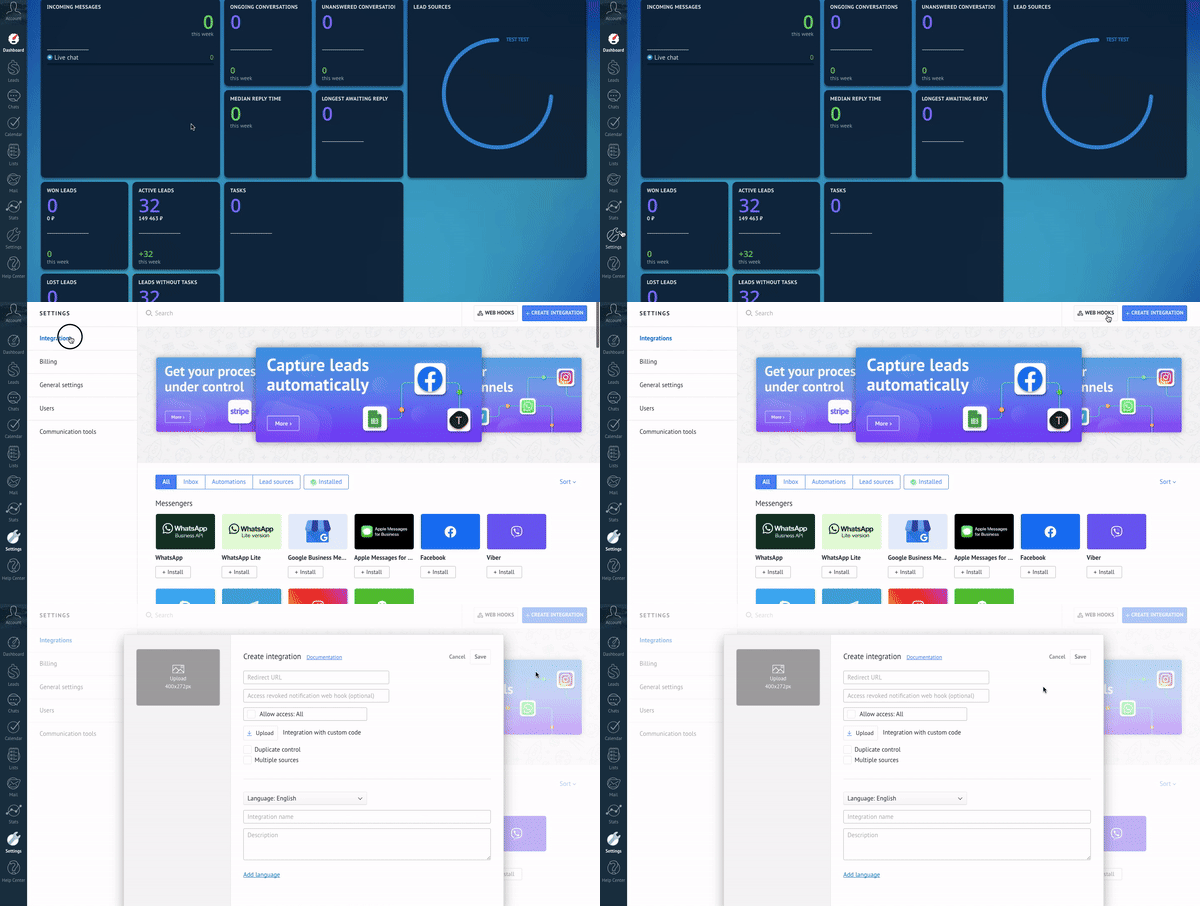
1. Generate the token on Kommo:
Access the Kommo panel.
Go to Settings > Integrations.
Click Create Integration and fill out the form.
After creation, copy the client key (Client Secret).
📘 Tip: For more details on how to create the integration on Kommo, you can access the official developer guide: Kommo Private Integration Guide
2. Activate integration in Falaê:
- Access the Falaê platform.
- Go to Settings > Integrations.
- Select the Kommo option.
- Enter:
- The key copied in the previous step.
- The subdomain of your Kommo account.
🔍 What is the subdomain? If the URL to access your Kommo account is
https://sistema.falae.app, you must enter onlysistema. In other words, everything that comes before.kommo.comor.falae.app.
- Click Configure to activate the integration.
What happens after activation?
- The custom fields "NPS" and "Birthday" will be automatically created in your Kommo account (if they don't already exist).
- All new customers registered with Falaê will be automatically sent to Kommo with this information filled in.
- The process is continuous and synchronized, without the need for manual actions.