
Cardápio Web
Integration with Cardápio Web allows all orders placed on the platform to be automatically sent to Falaê. If the customer uses the integration with Cinndi, the satisfaction survey can be sent directly via WhatsApp, ensuring an optimized flow of feedback.
Step-by-Step Configuration
- Access the Integrations screen on the Falaê platform.
- Search for "Cardápio Web" and click “Activate”.
- Add Integration Token.
- Select the satisfaction survey you want to link.
- Copy the link generated by the integration.
- Add the link in the Webhook section of Cardápio Web.
How to Obtain the Token on the Cardápio Web Platform?
To access the API endpoints, it is necessary to provide a token in the request header. This token is exclusive for each establishment and must be generated on the Cardápio Web Portal.
📌 Generating the Token
- Access the Cardápio Web Portal.
- Go to the Settings section.
- Click on the Integrations option.
- Select the API option.
- In the Token area, you can:
- View an already generated token.
- Create a new token, if necessary.
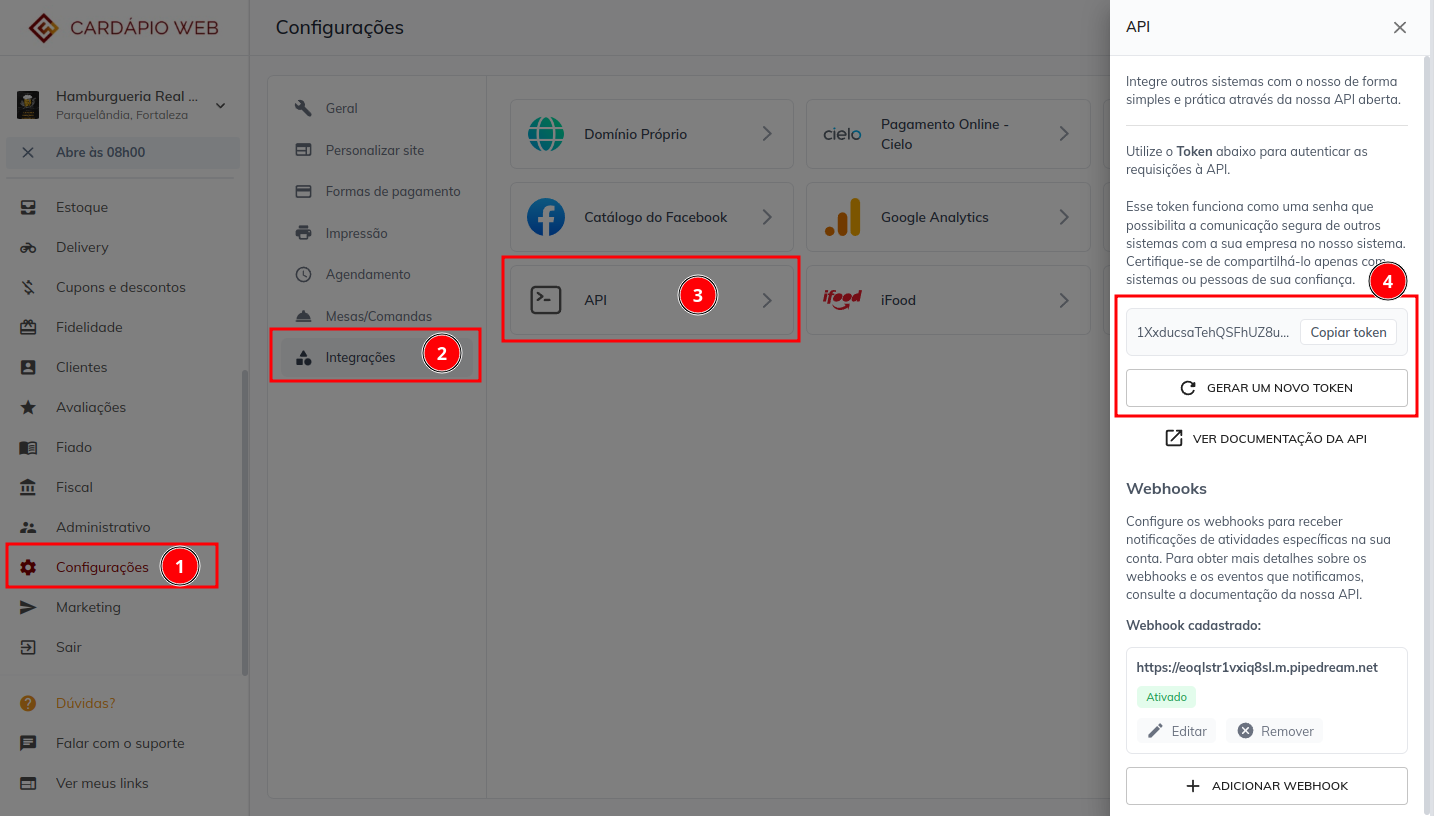
Image taken from the Cardápio Web documentation on how to generate the Token
Registering the Webhook URL in Cardápio Web
For Cardápio Web to send orders to Falaê, follow these steps:
- On the Cardápio Web Portal, access the Settings section.
- Choose the Integrations option.
- Select API.
- Go to the Webhooks area (only available if the token has already been generated).
- Add the generated link in the Webhook configuration.
Benefits of Integration
- Automatic sending of orders from Cardápio Web to Falaê.
- Possibility to trigger surveys via WhatsApp with Cinndi.
- Optimized flow of feedback to improve the customer experience. After configuration, order data will be automatically integrated into Falaê, allowing for more detailed monitoring of customer satisfaction! 🚀